What’s New at FleetPulse – April 2026

Every month we ship features built directly from what customers tell us. April was a productive one – three updates that give you more visibility, tighter access control, and an easier way to track trailer mileage. 

Investigate incidents faster with self-service reports

When something goes wrong — a cargo claim, a missed stop, a damaged load — the first thing anyone wants is a clear picture of what happened. Where was the trailer? When were the doors opened? Is there cargo imagery?

Until now, pulling that information meant piecing it together from multiple places. Not anymore. The new self-service report feature lets you compile a full trailer activity report — location history, stop data, door events, and cargo images — at the press of a button.

Find it in the “Report” button inside the trailer drawer. Customers have already told us it’s changing how they handle claims and carrier accountability conversations. Some teams are using it for driver and staff training too.

Control what third-party installers can see

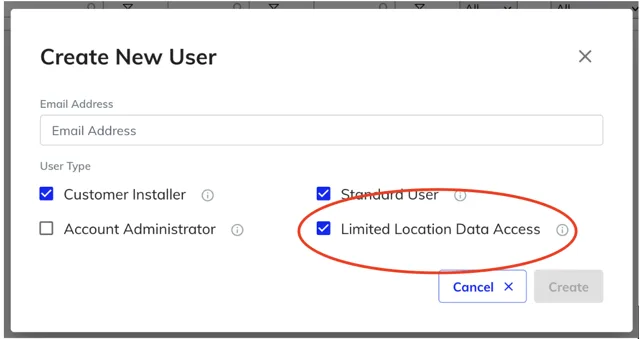
A lot of FleetPulse customers use outside contractors to pair and unpair devices on trailers. That’s fine — but those installers don’t need to see where your trailers are or what they’re doing. Giving them full account access was the only workaround, and it created a data exposure problem that never felt right.

We’ve fixed that. There’s now a new user type called “Limited Location Data Access.” Assign it to any third-party installer, and they get a stripped-down view of FleetPulse — enough to pair and unpair devices, nothing else. No location data, no fleet visibility.

If you outsource any of your device installation work, this one’s for you.

Track trailer mileage in one place

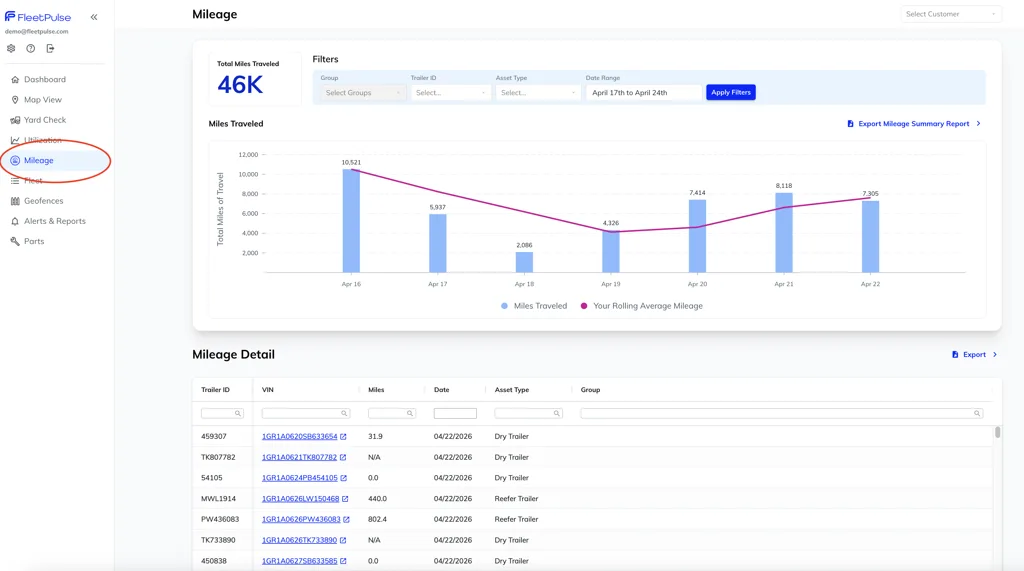
If you lease trailers and bill by the mile — or if you simply want to understand how hard your assets are working — you needed a better answer than the old Insights page.

The new Mileage tab is that answer. Filter by trailer, fleet, date range, asset type, or group and see exactly how far your trailers have traveled. It replaces Insights entirely with cleaner data and a more useful interface.

Log in to explore all three updates. As always, reach out to your customer success manager or email [email protected].