
Your Idle Trailers Have a Price Tag. Now You Can See It.
How FleetPulse's redesigned Dwell and Utilization page turns sitting trailers into detention records, cost figures, and a list you can act on Monday morning.
Every day a trailer sits, it costs you. Maybe it's parked at a shipper who's slow to unload. Maybe it's in the back row of your own yard and hasn't moved in six weeks. You know it's happening. The hard part is proving where, how long, and what it's worth.
This month, FleetPulse released a redesigned Dwell and Utilization page built to answer exactly that. It puts a dollar figure on dwelling trailers, shows you where they're piling up, and takes you from the big picture to the specific trailer IDs in one click. No spreadsheets required.
The problem: you can feel dwell, but you can't prove it
Most fleets know some trailers are sitting too long. Few know how many, where, or what it's costing them. So they export utilization data and rebuild it in spreadsheets every week.
We kept hearing the same two frustrations from customers:
- "I know some of my trailers are sitting too long, but I can't tell where, why, or what it's costing me."
- "I know I should be charging customers with detention, but I don't have good enough records to substantiate how much, or why."
When a customer pushes back on a detention charge, "your site held our trailer forever" won't hold up. You need dwell days, locations, and a cost you can stand behind. And internally, every trailer idling in your own yard is capacity you're paying for but not using, which often leads to buying trailers you don't need.
What's new on the Dwell and Utilization page
The redesigned page replaces the old Fleet Utilization view. It's built so a fleet operations manager can open it on Monday morning and know what to act on within 60 seconds.
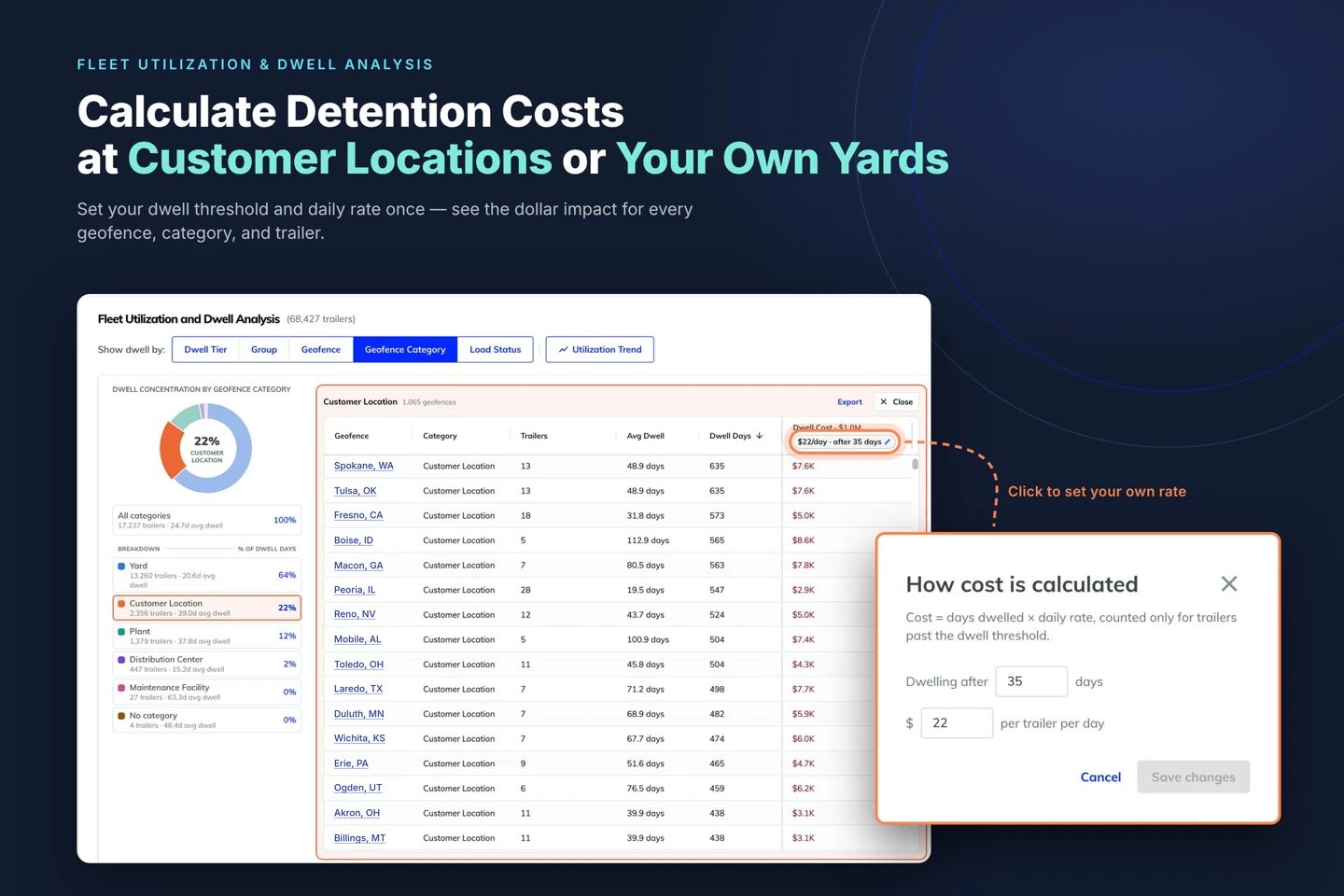
- A built-in dwell cost calculator, set to your business. FleetPulse puts a dollar figure on every dwelling trailer. The default starts counting after 60 days of dwell at $22 per trailer per day (a national average). Cost only counts the days past that threshold. So a trailer that's been sitting 118 days is 58 days past it, and 58 × $22 = $1,276. Your numbers different? Change them. If you start counting at 45 days and $16 per trailer per day, enter that and every cost, chart, and total on the page recalculates instantly.
- Slice your fleet the way you think about it. One "Show dwell by" bar lets you view dwell five ways:
- Dwell Time Tier — trailers bucketed 0–7, 7–14, 14–30, 30–60, and 60+ days
- Group — compare terminals, regions, or business units, ranked by dwell cost
- Geofence — your top 10 sites by total dwell days
- Geofence Category — dwell cost at customer locations vs. plants, yards, distribution centers, and more
- Load Status — separate loaded trailers (freight that isn't moving) from empties that could be earning
- From chart to trailer in one click. Every view opens on an interactive donut chart. Click any slice and the trailer list opens right beside it, sorted longest dwell first, with location, geofence, group, load status, and cost for each trailer. A Total row shows the slice's trailer count, average dwell vs. your fleet average, and total cost.
- Know if you're getting better. Fleet average dwell sits at the top of the page with its week-over-week change. One click on Utilization trend shows your weekly or monthly utilization against the FleetPulse average.
- Export and send. Export just the trailers you're looking at to CSV and hand the list to whoever can move them, or attach it to a detention conversation.
Three ways fleets are putting it to work
Building a detention case. Switch to Geofence Category and click Customer Location. Then drill into the customer site with the most total dwell days and see every trailer sitting there. Set the cost threshold to match the free time you give customers, whether that's 2 days or 10, and the cost column shows what that dwell is worth. Now you can go to a customer with a record, not a hunch: "By our records, 16 of our trailers have been at your site for 116 days. Let's talk." FleetPulse doesn't send detention invoices (your billing terms, weekends, and holidays are still yours to apply), but it gives you the data to decide when and whether to bill. Tip: this view needs your customer sites set up as geofences with the Customer Location category.
Getting loaded freight moving. Click Load Status, then Loaded. A loaded trailer that's been sitting 60+ days is freight that isn't moving. Start there, export the list, and send it to the team that can act on it. (This view uses load sensor data.)
Right-sizing before you buy. Click Group or Geofence to see where idle trailers are concentrated. When 30 empties are sitting at one yard while another terminal is short, the fix is obvious, and it's a lot cheaper than new equipment.
A simple weekly rhythm: open the page every Monday, check whether fleet average dwell went up or down, work the 60+ day list, and compare your utilization to the FleetPulse average. As dwell drops, tighten your threshold and keep going.
Get started
Already a FleetPulse customer? The new page is live in your account now under Fleet Utilization, and it works on mobile too. The Group, Geofence, and Load Status views use groups, categorized geofences, and load sensors, so if a view looks empty, that's a setup step, not a bug. Need help setting up customer geofences or picking your threshold and daily cost? Reach out to your Customer Success Manager or support@fleetpulse.com.
New to FleetPulse? Let's talk about how you manage dwell and utilization today. Book a 20-minute conversation and we'll show you where your fleet's dwell time is going and what it's worth.